


What if the single biggest upgrade to your gameplay isn’t a faster graphics card or a new mouse, but the slab of plastic and switches sitting under your left hand? That question sounds like marketing hype until you press a key on a board that actually fits how you play. The best gaming keyboard isn’t the one with the flashiest RGB or the longest feature list. It’s the one whose switches, size, and connection match your hands, your desk, and the games you actually play.
This guide breaks down what matters, what’s overhyped, and how to avoid the mistakes that leave people buying a second keyboard six months later.
Why the “best” gaming keyboard depends entirely on you
There is no universal champion. A competitive FPS player chasing split-second reactions wants something very different from an MMO raider juggling twenty abilities, and both want something different from a streamer who also types for a living.
That’s the first thing to internalize. Most “best of” lists quietly assume a single use case, then rank everything against it. In practice, the category splits into a few clear paths:
| Player type | Priority | What to look for |
|---|---|---|
| Competitive FPS | Fast, precise input | Linear or hall-effect switches, compact size, 1,000 Hz polling |
| MMO / MOBA | Many commands | Macro keys, full-size layout, tactile feedback |
| Hybrid work + play | Comfort and quiet | Tactile or silent switches, wireless, full-size with numpad |
| Budget builder | Value | Solid membrane or entry mechanical, NKRO, wired |
Pick your row first. Everything else follows from it.
Switches: the decision that shapes everything
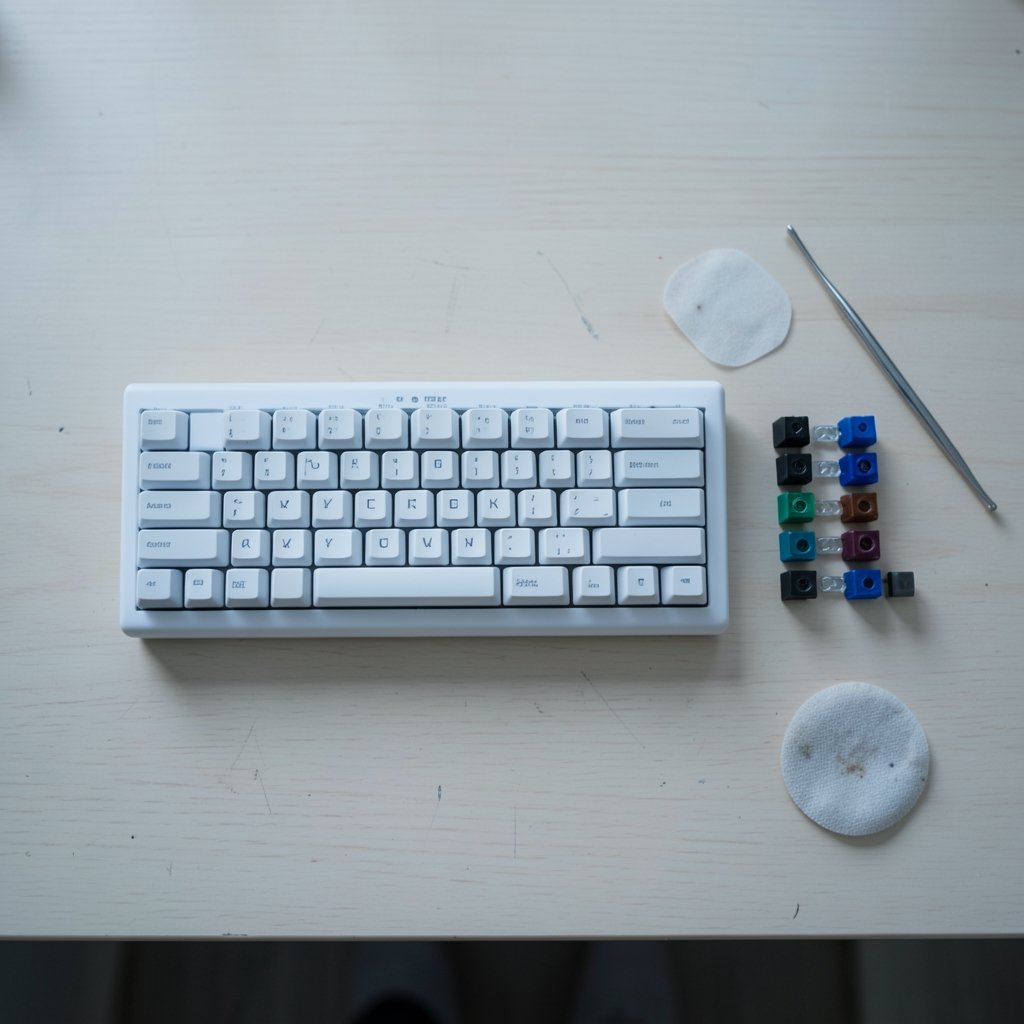
If you only research one thing, research switches. They determine how the keyboard feels, sounds, and performs, and they’re the hardest part to change later (unless you buy hot-swappable, which is worth considering).
Mechanical switches use a discrete physical mechanism per key. They come in three broad flavors:
- Linear switches travel smoothly with no bump. They’re popular for gaming because there’s no tactile “hump” to push through, so rapid repeated presses feel clean.
- Tactile switches have a noticeable bump partway down. Many people find them more satisfying for typing while still being fine for games.
- Clicky switches add an audible click on top of the bump. Great if you love the sound, less great if anyone shares your room or you record audio.
Membrane keyboards use a rubber dome under each key. They’re quieter and cheaper, and plenty of people game on them happily. The tradeoff is mushy-feeling presses and shorter lifespans on heavily used keys.
Hall-effect (magnetic) switches grew sharply as a category from roughly 2023 into 2024. They sense magnetic field changes instead of physical contact, which allows adjustable actuation points (how far a key must travel before it registers) and rapid trigger (the key resets the instant you ease off). For competitive players, that combination has real use beyond marketing. Tuning takes setup time, and a badly tuned rapid trigger can cause accidental inputs.
A practical tip from the field: don’t judge switches from a spec sheet. Sound tests and force graphs help, but feel is personal. Buy from a retailer with a return window, or try a switch tester first. The most common mistake is buying clicky switches for a shared space, or buying ultra-light linear switches and finding them too sensitive for typing.
Form factor: stop paying for keys you never press
Full-size boards include a number pad. That’s wonderful for spreadsheets and terrible for desk space if you play with a low mouse sensitivity and need room to swing.
The common sizes:
- Full-size (100%): everything, including numpad and often media keys.
- TKL (tenkeyless): drops the numpad, keeps arrow keys and the navigation cluster.
- 75%: compresses the layout, keeps arrows and function row, saves serious space.
- 65%: drops the function row, keeps arrows.
- 60%: drops arrows and function row entirely; relies on layers.
Smaller boards free up desk space for mouse movement, which matters more than most people expect. The catch is that 60% and 65% layouts push functions onto layered key combos, which is fine for gaming but can slow down heavy typing until you adapt. If you do a lot of data entry, keep the numpad.
Polling rate, rollover, and the specs that get oversold
Polling rate is how often the keyboard reports to the PC. Gaming boards typically run 1,000 Hz (about 1 ms), and some recent models advertise 4,000 Hz or 8,000 Hz. Here’s the honest take: gains above 1,000 Hz are debated and depend on your whole system, including your monitor and how the game handles input. Treat very high polling numbers as a nice-to-have, not a reason to pay double.
N-key rollover (NKRO) means the keyboard can register many simultaneous keypresses. Anti-ghosting prevents missed or phantom presses when multiple keys go down at once. Both are standard on most gaming keyboards now, so don’t let either be the headline that sells you a board.
Hot-swappable sockets let you pull switches out and drop new ones in without soldering. This is one of the most underrated features. It extends the keyboard’s life and lets you change your mind about switch feel later, which is exactly the mistake-proofing most buyers need.
Keycaps matter more than people think. PBT plastic resists the oily shine that develops on ABS caps over months of use. Profiles (OEM, Cherry, SA) change the height and curve of the keys, which affects typing comfort. If you plan to keep a board for years, PBT is the safer bet.
Wired or wireless? The latency question
Wired USB is the simplest, most reliable choice, and it never needs charging. For competitive play, it’s still the default recommendation.
Wireless comes in two flavors. 2.4 GHz via a dongle is the gaming-grade option, built for low latency. Bluetooth is better for switching between devices, like a laptop and a desktop, but it’s not the first choice for twitchy games. Many premium boards offer both plus wired mode, which is the most flexible setup if your budget allows.
One practical warning: wireless boards add charging to your routine. If you’re the kind of person who forgets, wired saves you the mid-match panic.
Matching the board to your game and your desk
Competitive FPS players tend to gravitate toward compact boards with linear or hall-effect switches, because arm room for the mouse matters and rapid, clean key presses matter. MMO and MOBA players often want macro keys and a full layout, since juggling many abilities benefits from dedicated buttons. Players who also work at the same desk usually land on a TKL or 75% with tactile or silent switches, balancing comfort and quiet.
Desk depth is the silent factor. Measure before you buy. A full-size board plus a large mousepad can swallow a narrow desk, and no amount of switch quality fixes a setup that leaves your mouse arm cramped.
If you’re deep in the gaming culture side of things and want a handle that fits your new setup, browsing lists of the best gaming nicknames is a fun rabbit hole, and there are plenty of cool gaming nicknames if you prefer something sharper. Some players even lean into funny gaming names for a lighter vibe.
Common buying mistakes that cost real money
A few patterns show up again and again among people who end up disappointed:
- Buying for RGB instead of feel. Lighting is fun for a week. Switch feel is forever.
- Ignoring the return window. Switch preference is personal. Buy somewhere you can send it back.
- Overpaying for polling rate. 8,000 Hz sounds impressive and rarely changes outcomes.
- Skipping the desk measurement. The best board in the world is useless if it doesn’t fit.
- Forgetting sound. Clicky switches in a shared room or on mic are a fast route to regret.
- Assuming expensive means durable. PBT keycaps and hot-swap sockets often matter more than price tier.
There’s a broader lesson here about buying gear with intention rather than hype, the same principle behind understanding how board education actually does matter when you’re making a purchase decision. Knowing what a product is really for beats chasing a label. The same goes for niche gear: just as you’d learn what a boogie board actually rides like before choosing one, a keyboard deserves a few minutes of honest research before checkout.
Setting up your keyboard for actual performance
Once the box is open, a few tweaks separate a good experience from a frustrating one. Update the firmware first, since many boards ship with older software. If you have hall-effect switches, set your actuation point deliberately instead of leaving it at the default, and enable rapid trigger only for the keys you need it on. Test in your main game rather than only in a config tool.
If you use macros, keep them legal for your game’s rules. Plenty of competitive titles restrict or ban certain macro behavior, and a ban is a steep price for convenience.
Clean the board periodically. Dust and crumbs under keycaps cause sticky presses and, over time, dead switches. A soft brush and a can of compressed air go a long way.
And if you’re curious about unconventional input devices, there are genuinely strange experiments out there, like turning a dance mat keyboard typing setup into real typing. They’re fun to read about, but they also underline why a purpose-built board wins for serious play.
How much should you actually spend?
Entry mechanical boards cover the essentials: decent switches, NKRO, and a wired connection. Mid-range is where hot-swap sockets, PBT keycaps, and better build quality appear, and it’s usually the sweet spot for most buyers. Premium boards add hall-effect switches, high polling rates, wireless modes, and nicer materials.
The honest advice: spend on switches and build quality, not on feature counts. A well-built mid-range board with switches you love will outperform a flagship with switches you tolerate. And if you’re unsure, buy the cheaper board first, learn what you like, and upgrade with real knowledge instead of guesses.
Conclusion
The best gaming keyboard is the one that disappears under your fingers, not the one that wins a spec-sheet argument. Start with your use case, choose switches that match how you actually press keys, pick a size that fits your desk, and treat polling rates and RGB as garnish rather than substance. Buy from somewhere with a return window, favor hot-swap sockets and PBT keycaps if you want longevity, and give yourself a week to adapt before deciding a board isn’t for you.
Get those basics right and you’ll stop shopping for keyboards entirely, which is the real win.
Frequently Asked Questions
Are mechanical keyboards actually better for gaming?
Not automatically. Mechanical boards offer more switch variety, easier repair, and typically longer lifespan, which is why most gaming-focused boards are mechanical. But a good membrane keyboard can serve casual players perfectly well. The right answer depends on your budget and how much you care about feel and customization.
What is a hall-effect keyboard, and do I need one?
Hall-effect keyboards use magnetic switches that let you set how far a key travels before it registers, plus rapid trigger for near-instant resets. They’re genuinely useful for competitive players willing to tune them. For everyone else, a standard mechanical board with switches you like is a better use of money.
Is a higher polling rate worth paying for?
Usually not by itself. Most gaming keyboards run at 1,000 Hz, which is already fast. Rates of 4,000 Hz and 8,000 Hz exist, but real-world benefits are debated and depend on your full system. Spend the difference on better switches or build quality instead.
Should I get a full-size or a smaller keyboard?
Full-size boards include a number pad, which helps with data entry and MMOs. TKL, 75%, and 65% boards free up desk space for mouse movement, which competitive players tend to value. Measure your desk and think about which keys you actually press before deciding.
What does hot-swappable mean, and why does it matter?
Hot-swappable sockets let you remove and replace switches without soldering. It matters because switch preference often changes after real use, and hot-swap lets you fix that without buying a new keyboard. It also makes repairs easier if a single switch fails.
Wired or wireless for gaming?
Wired USB is the simplest and most reliable choice, with no charging to worry about. Wireless 2.4 GHz through a dongle is built for low latency and works well for most players, while Bluetooth is better suited to switching between devices than competitive play. Many premium boards offer all three modes.











